Are you scratching your head trying to remember an old username? Maybe you’re curious about your Instagram journey, or you need to recall a past handle for some reason. Whatever brought you here, I get it – our online identities can be a big part of who we are.
Instagram is a huge part of our lives. With over 2 billion active users, it’s where we share our moments, connect with friends, and sometimes reinvent ourselves. And that reinvention often starts with a username change.
But here’s the thing – finding your old usernames isn’t as simple as tapping a button. Instagram doesn’t put this info front and center, and you might be feeling a bit lost trying to dig it up. Don’t sweat it, though. That’s exactly why you’re here, and I’m going to help you out.
In this guide, we’re going to walk through the steps to uncover your Instagram username history. Whether you’re on your phone right now or scrolling on your computer, I’ve got you covered.
Why would you want to see your old usernames?
Before we jump into the how-to, let’s chat about why you might want to look up your old usernames. Maybe you’re feeling nostalgic about your Instagram evolution.
Or perhaps you need to recall an old username for something important. Whatever your reason, Instagram makes it possible to peek into your username history.
Instagram isn’t just for sharing photos and stories – it’s also a platform where you can reinvent yourself. Changing your username is a breeze, whether you’re rebranding, upping your privacy game, or just in the mood for something fresh.
But what about those old identities you’ve left behind? Let’s find out how to uncover them.
How can you see your old Instagram usernames?
- Open the Instagram app on your phone. It’s that familiar camera icon you tap every day.
- Go to your profile by tapping your profile picture in the bottom right corner.
- Look for the menu icon (those three horizontal lines) in the top right corner of your profile and tap it.
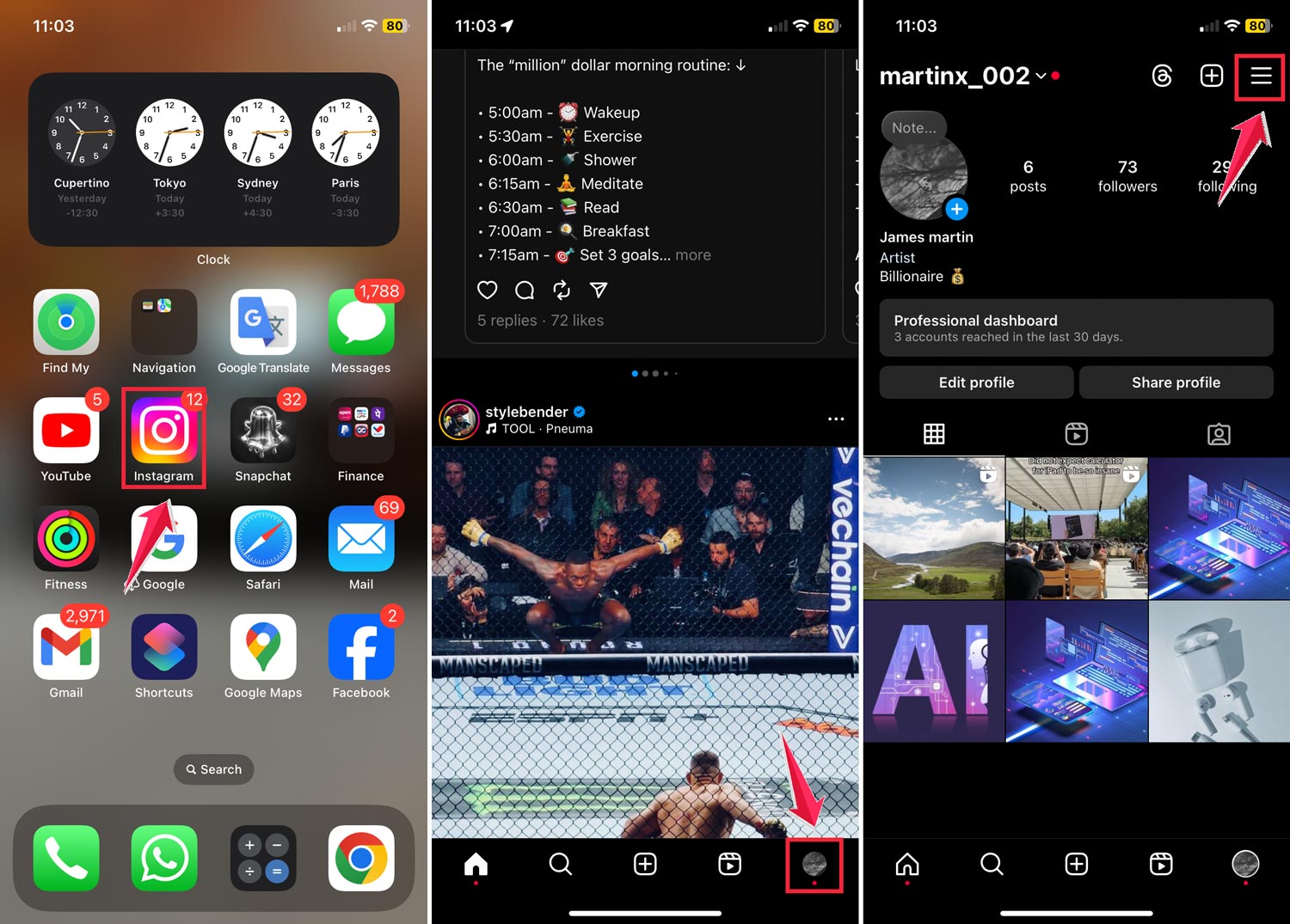
- From the menu, select “Settings and Activity”.
- In this new screen, tap on “Your activity”.
- Scroll down until you see “Account history” and tap on it.
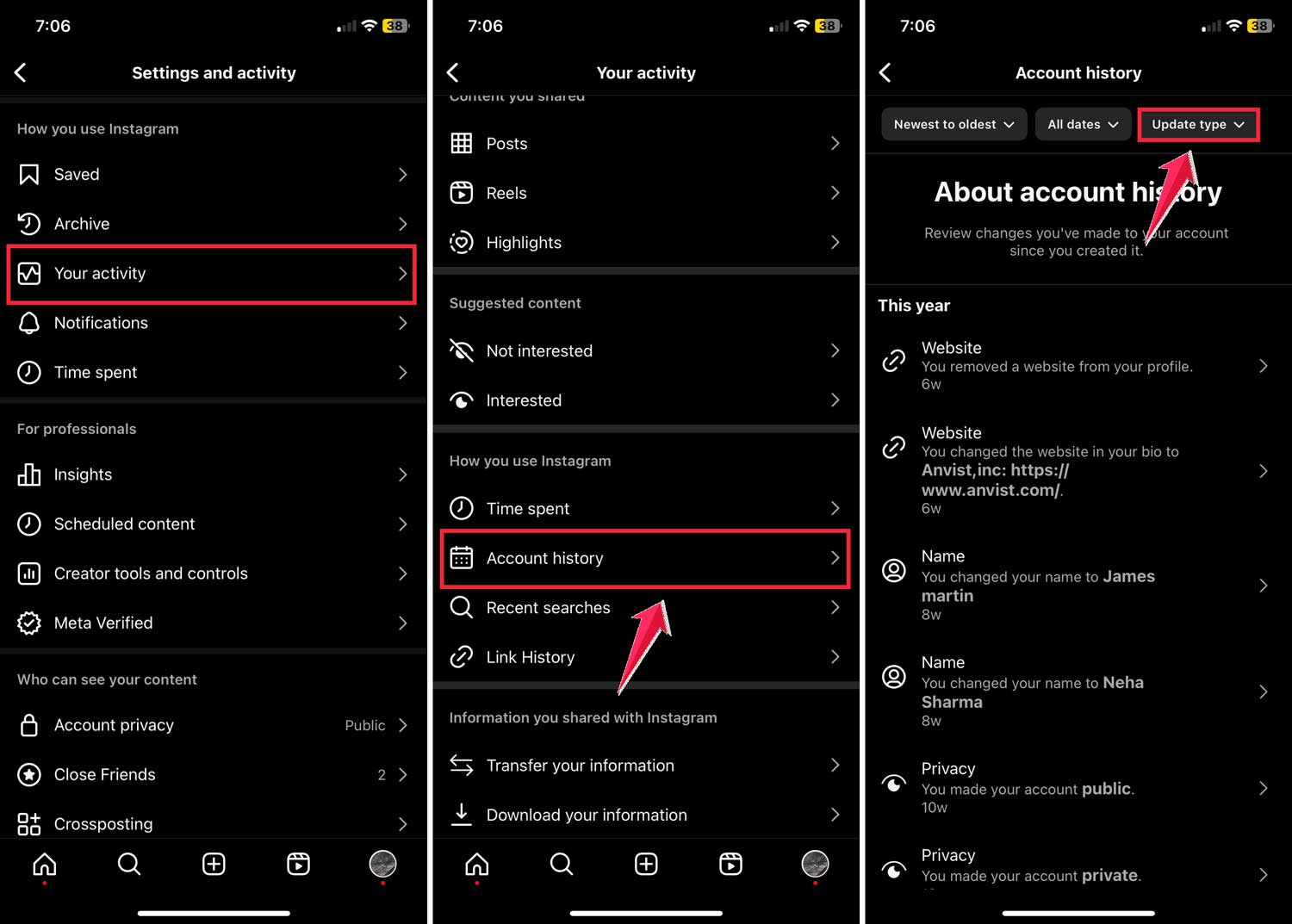
- Now, you’re in the Account History section. To see just your username changes, tap on “Update type” at the top of the screen.
- In the filter menu that pops up, scroll down and select “Username”, then tap “Apply”.
- Voila! You’ll now see a list of all your old Instagram usernames, from newest to oldest.

Isn’t it cool to see how your Instagram identity has evolved over time? You can see when you made each change and what your previous usernames were.
Can you see someone else’s old Instagram usernames?
Instagram allows you to view past usernames for certain types of accounts, mainly for transparency reasons. This feature is typically available for business accounts, creator accounts, and accounts of public figures. Here’s how you can check:
- Go to the profile of the account you’re curious about.
- Tap or click on the three dots at the top right of their profile.
- Scroll down and select “About”
- Select “About Your Account” from the menu.
- Look for a section called “Former usernames.”

If the account has changed its username and falls into one of those categories I mentioned, you might see their old usernames listed here. But keep in mind, not all accounts will show this information.
What should you keep in mind about Instagram usernames?
Before you go on a username-changing spree, there are a few things you should know:
1. Recent changes only: Instagram typically only shows your most recent username changes. If you’ve switched names multiple times or the changes were a long time ago, you might not see all of them.
2. Security considerations: Changing your username too often might raise some red flags with Instagram’s security measures. Your account could end up looking suspicious, so it’s best not to go overboard with the changes.
3. Beware of scams: Unfortunately, some people change their usernames frequently to impersonate others or pull off scams. Always be cautious if you notice an account changing names often.
The takeaway
So there you have it – your guide to uncovering old Instagram usernames. Whether you’re taking a trip down memory lane or doing some digital detective work, now you know how to access this hidden feature of Instagram.
Remember, each username you’ve had is part of your Instagram story. It’s fun to look back and see how you’ve evolved on the platform. Just be mindful of changing your username too often, and always stay alert for any suspicious activity.
Have fun exploring your Instagram history! And who knows? Maybe you’ll be inspired to come up with an even cooler username for your next change.