Instagram is a massive platform, with over 1 billion monthly users exchanging countless messages. With such a bustling inbox, it’s no wonder you might sometimes lose track of important conversations. That’s where the orange flag in your Instagram messages comes into play.
You might have noticed this small icon popping up in your chats and wondered what it means. Don’t worry – you’re not alone. Many Instagram users are curious about this feature and how it can help them.
The orange flag is Instagram’s clever solution to inbox overload. It’s designed to help you manage your conversations more effectively, whether you’re chatting with friends or handling customer inquiries for your business. But how does it work, and why should you care?
In this article, you’ll learn all about the orange flag in your Instagram messages. You’ll discover how this simple feature can make a big difference in how you handle your conversations, potentially saving you time and stress in your social media life.
Why should you care about the orange flag feature?
The orange flag in your Instagram messages is more than just a colorful icon – it’s a powerful tool that can make your chat life much easier. Here’s why you should care about this feature:
1. Helps to keep important chats front and center
With the orange flag, you can mark messages that need your attention. It’s like putting a sticky note on your most important conversations. This comes in handy when your inbox is overflowing with chats.
2. Helps to find key messages in a snap
Ever spent ages scrolling through old messages trying to find that one important bit of info? The orange flag helps you avoid that hassle. You can quickly spot and jump to flagged messages, saving you time and frustration.
3. You will never forget to follow up
Sometimes, you read a message but can’t reply right away. The orange flag acts as a reminder, helping you keep track of chats you need to get back to later.
For your personal chats, the orange flag can help you:
- Keep tabs on important plans or time-sensitive info from friends and family
- Easily find and refer back to key conversations
- Remember to respond to messages you’ve read but haven’t answered yet
If you use Instagram for business or as an influencer, you’ll find it useful for:
- Spotting and quickly responding to important customer questions
- Making sure you don’t miss crucial messages from clients or partners
- Organizing your replies to provide better, faster service
Think of the orange flag as your personal assistant for your Instagram inbox. It helps you sort out what’s important, keeps your messages organized, and makes sure you follow up when needed.
By using this feature, you can handle your Instagram chats more smoothly, whether you’re catching up with friends or managing business conversations.
How do you use the orange flag feature?
Using the orange flag feature on Instagram is straightforward. Here’s a step-by-step guide to help you flag important messages:
- Launch the Instagram app on your mobile device.
- Go to your Direct Messages.
- Find and open the chat containing the message you want to flag.
- Look for the flag icon at the top of the chat window. Tap this icon to flag the entire conversation.

Once you’ve flagged a conversation, it will be marked with an orange flag in your message list. This makes it easy to identify and access important chats later.
To view all your flagged messages:
- Go to your Direct Messages.
- Tap on Filter.
- Look for the Flagged category at the top of your message list.
- Tap on this category to see all your flagged conversations in one place.
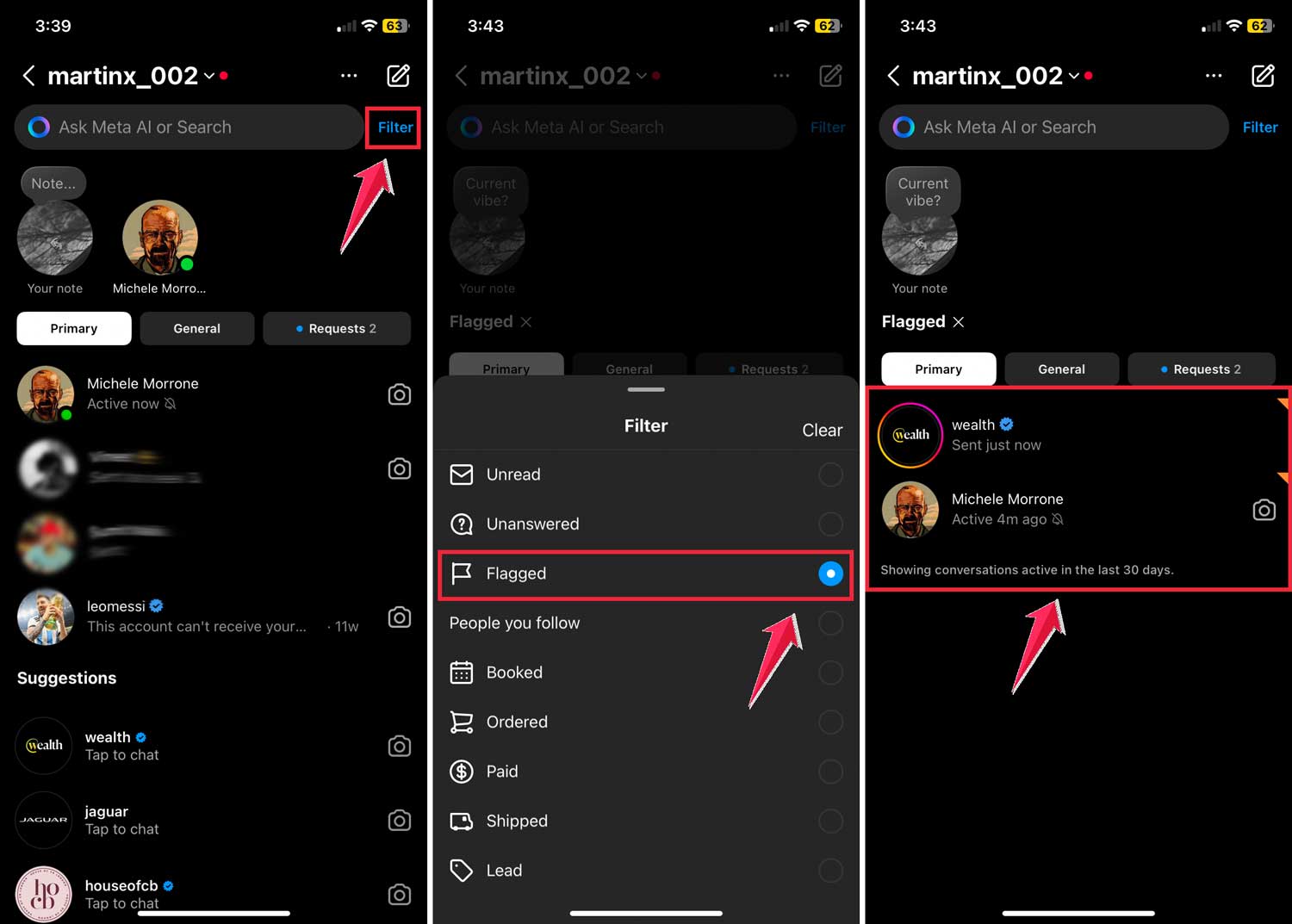
To remove a flag:
Simply repeat the flagging process. Tap the flag icon again in the conversation you want to unflag.
Remember, flagging a conversation is visible only to you. The other person in the chat won’t know you’ve flagged your conversation with them.
Can everyone use this nifty feature?
You bet! Whether you’re using Instagram to share cat photos or running a full-fledged business account, the orange flag feature is all yours.
But here’s a little bonus for the business folks: you get to sort your messages into ‘Primary‘ and ‘General‘ tabs. It’s like having an extra layer of organization to make sure you never miss an important customer message.
What to do if the orange flag isn’t working right
Even the most helpful features can sometimes act up. If you’re having trouble with the orange flag in your messages, don’t worry. Here are a few simple things you can try:
1. Make sure your app is up to date
First, check if you’re using the latest version of Instagram. Sometimes, a quick update can fix those annoying glitches. Head to your app store and see if there’s an update available.
2. Try the old “turn it off and on again” trick
It might sound too simple, but logging out of Instagram and then logging back in can often solve the problem. It’s like giving your app a quick refresh.
3. Ask for a helping hand
If you’ve tried the above and you’re still having issues, don’t hesitate to reach out to Instagram Support. They’re there to help you with exactly these kinds of problems.
The two types of flagging on Instagram: What you need to know
1. Flagging messages: Your personal organizer
When you flag a message on Instagram, you’re basically putting a digital sticky note on it for yourself. It’s like saying, “Hey, this chat is important!” Only you can see this flag, and it doesn’t change anything about the message itself. The person you’re chatting with won’t know you’ve flagged it.
So why do this? Well, it’s all about keeping your Instagram inbox tidy. When you flag a message, you’re making it easier to find later. Maybe it’s got important info you’ll need, or perhaps it’s a conversation you want to follow up on.
Either way, flagging helps you keep track of what matters most in your sea of chats. It’s a simple but powerful way to stay organized, especially if you get a lot of messages.
2. Flagging posts: Keeping Instagram safe for everyone
Now, flagging a post is a whole different story. When you flag a post, you’re not organizing things for yourself – you’re actually reporting content to Instagram. It’s like raising your hand and saying, “Hey Instagram, I think this post might be breaking the rules.”
When you do this, you’re sending a report to the folks at Instagram who keep an eye on things. They’ll take a look at the post to see if it goes against their community guidelines. If it does, they might take the post down or even take action against the account that posted it.
This kind of flagging is all about keeping Instagram a safe and positive place for everyone. It’s how you can help spot harmful or inappropriate content. Just remember, use this feature responsibly and only for posts that genuinely seem to break the rules.
The takeaway
Now you’re in on the secret of the orange flag in your Instagram messages. This little feature isn’t just a fancy addition – it’s a powerful tool that can transform how you handle your Instagram conversations.
Whether you’re managing a business account or just trying to keep track of chats with friends, the orange flag is your new best friend. It helps you prioritize important messages, find them quickly when you need them, and never forget to follow up. Remember, it’s your personal organizer – the other person won’t know you’ve flagged the chat.
Don’t confuse this with flagging posts, though. That’s a whole different ball game, aimed at keeping Instagram safe for everyone. When you flag a message, you’re just organizing your own inbox. When you flag a post, you’re reporting potential rule-breakers to Instagram.
So why not give the orange flag a try? Start organizing your Instagram inbox today. You might be surprised at how much time and stress it saves you. Who knows?