Are you scratching your head, trying to figure out where those Instagram follow requests you sent have gone?
Instagram has changed how you can see your sent follow requests. That easy method you used to rely on? It’s vanished. Poof! Gone. And it’s leaving a lot of us feeling pretty confused. It’s similar to how finding out who unfollowed you on Instagram has become more challenging.
Why did Instagram do this? Well, they’re always tweaking things to keep the platform safe and user-friendly.
But sometimes, these changes can leave us feeling a bit lost. Maybe you’re trying to clean up your pending requests, or perhaps you’re just curious about who you’ve tried to connect with. Whatever your reason, it’s frustrating when you can’t find what you’re looking for.
In this guide, I’ll walk you through two simple methods to uncover those hidden sent follow requests. Whether you’re on your phone or your computer, I’ve got you covered.
Why can’t you see your sent follow requests easily anymore?
Instagram is constantly evolving to enhance user experience and platform security. These changes sometimes affect how certain features operate, including the visibility of sent follow-up requests.
Platform security is a top priority for Instagram. They regularly update their systems to protect users from potential misuse or spam. This often involves modifying how certain features work or where they’re located within the app.
One of the main reasons for this change is to prevent automated misuse of the follow request feature. Some users were employing automated tools to send and cancel large numbers of follow requests, which goes against Instagram’s terms of service. By making sent requests less accessible, Instagram aims to discourage this behavior.
It’s important to note that your sent follow requests aren’t gone. They’re still recorded in your account data, but accessing this information now requires a few additional steps. This change helps maintain the integrity of user interactions on the platform.
How to check sent follow requests on your phone
Whether you’re using an iPhone or Android device, you can follow these steps to find your sent follow requests:
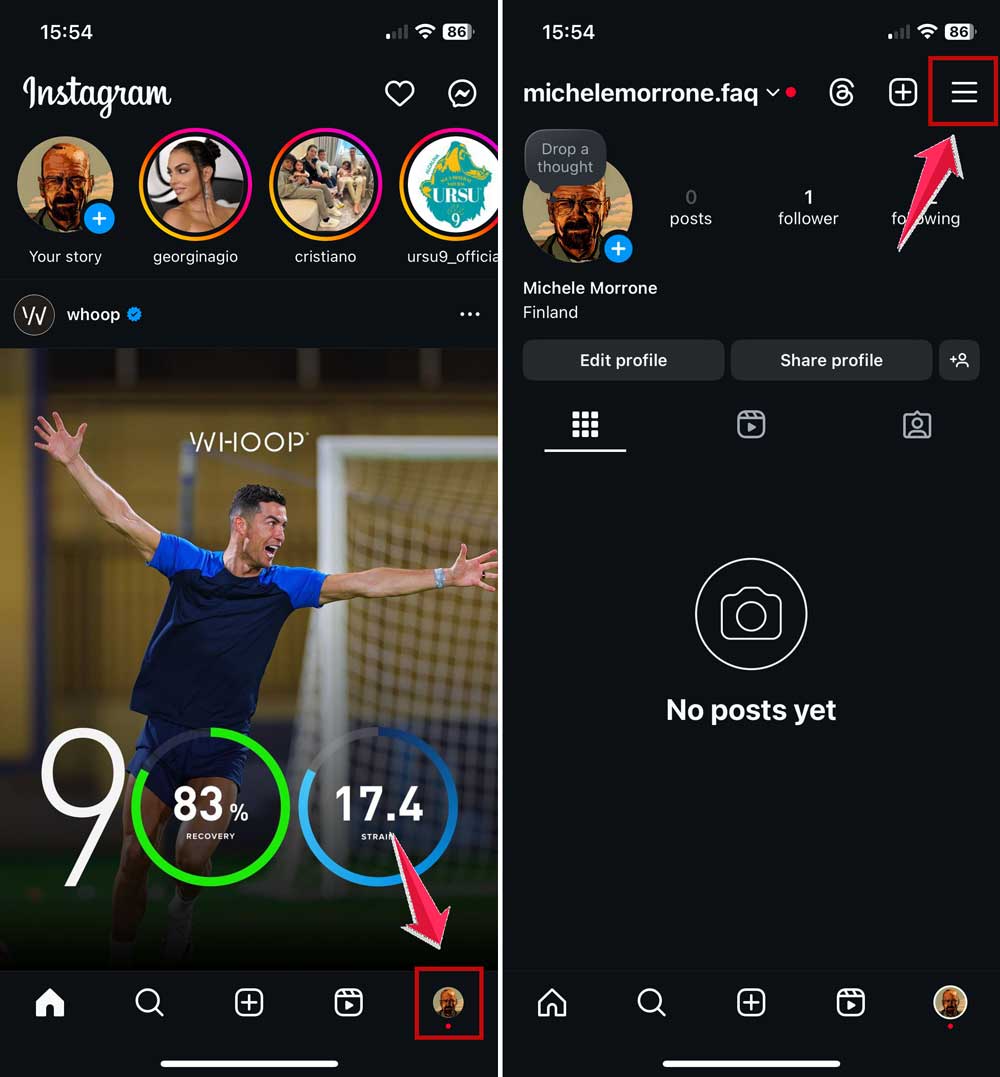
- Open Instagram and go to your profile by tapping your profile picture in the bottom right corner.
- Tap the three-line menu icon in the top right corner.
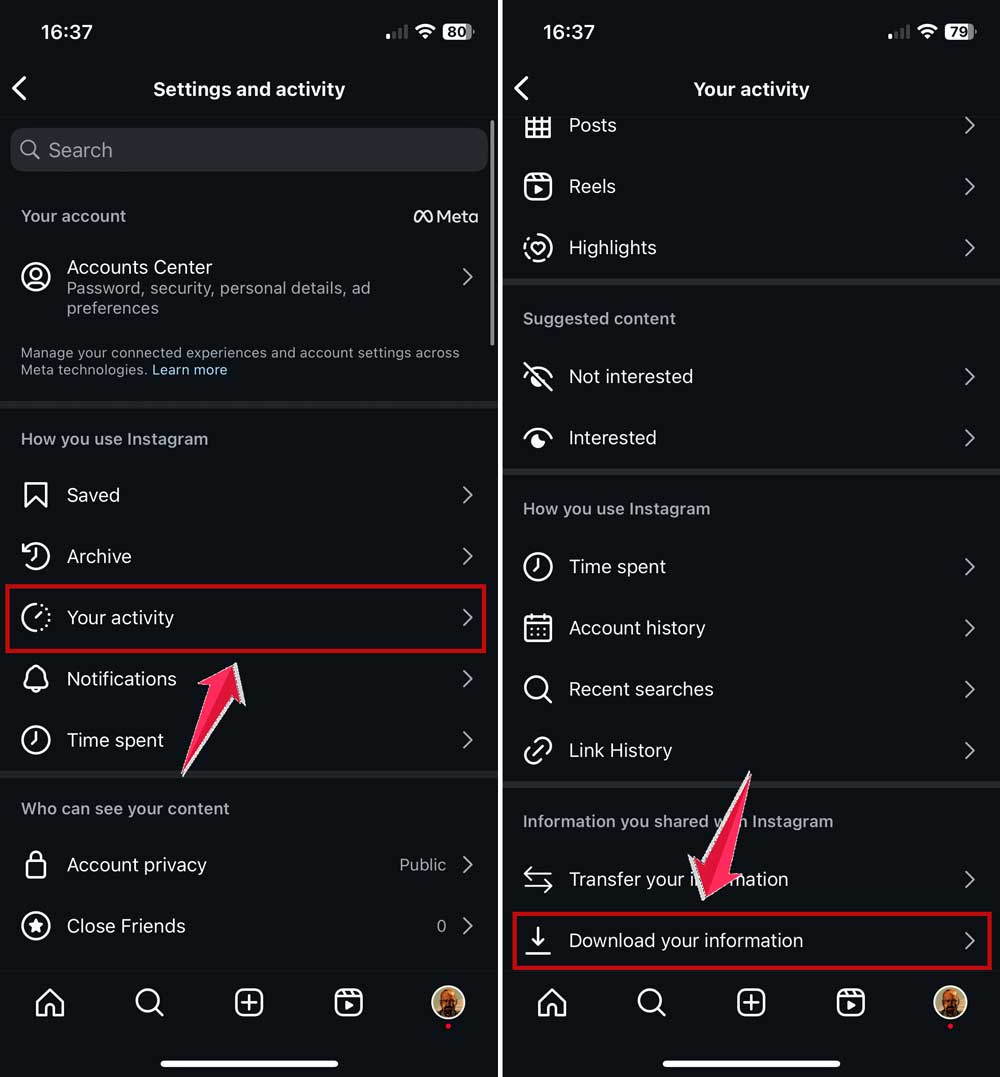
- Select “Your activity” from the menu options.
- Scroll down to the bottom and tap “Download your information”.
- Tap “Download or transfer information” and choose “All available information”.

- Then select “Download to device”. You may also choose “Transfer to destination” if you want to transfer your information to another device or service.
- Now, you’ll need to configure your download:
- Select the date range you’re interested in.
- Notify your email address where you want to receive the download notification.
- Choose HTML as the format for easier reading.
- You can also choose Media quality if you want to.

- Tap “Create files” and wait. Instagram may take some time to compile your data.
- When you receive the email notification, return to Instagram and tap the “Download” button.

- Locate the downloaded file on your device. On Android, check your file manager. On iPhone, look in Files > Downloads.

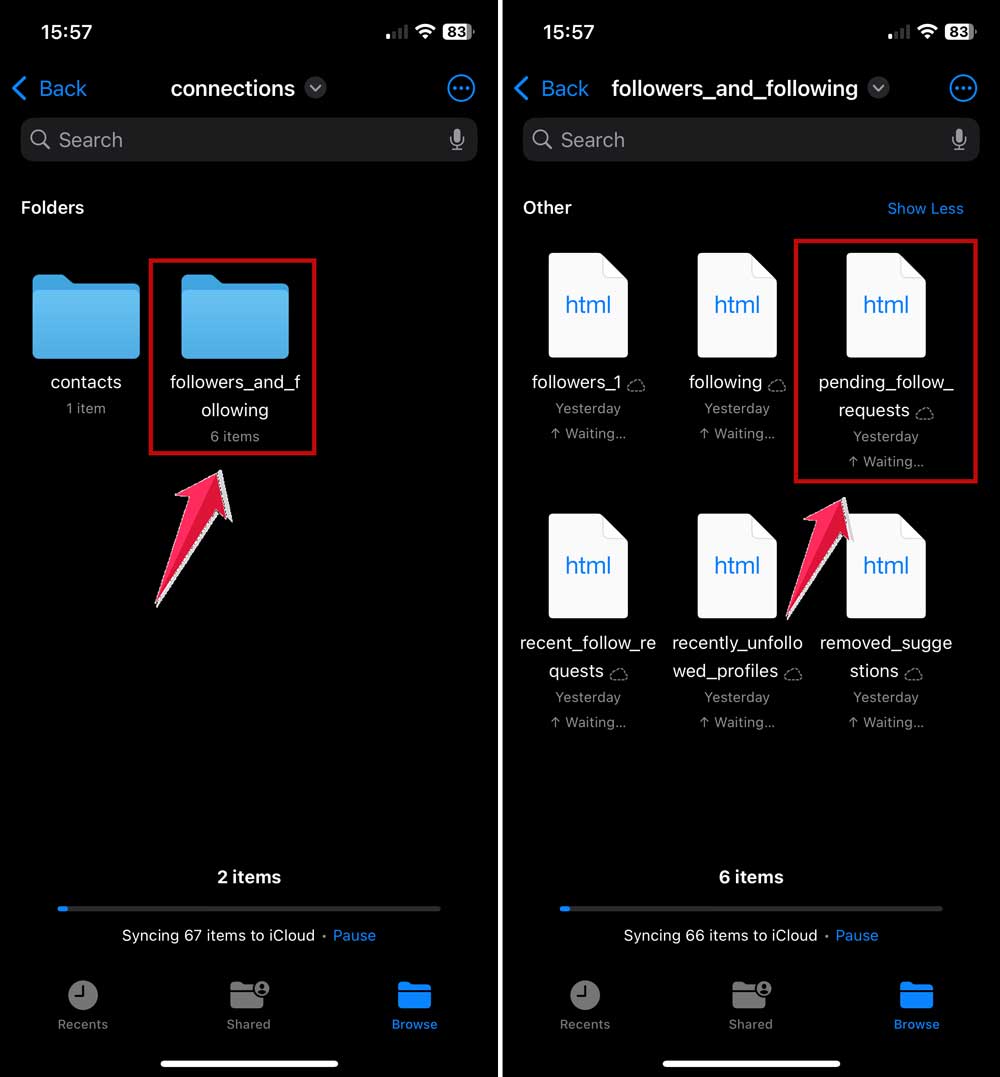
- Open the zip file and find the folder named “followers_and_following”. It is found inside the folder named Connections.
- Inside, you’ll see a file called “pending_follow_requests”. This contains your sent follow requests.
How to check sent follow requests on your computer
If you prefer using a desktop or laptop, here’s how to access your sent follow requests. Remember, using Instagram on your computer can be different from the mobile app, similar to how changing your Instagram layout works differently on various devices.
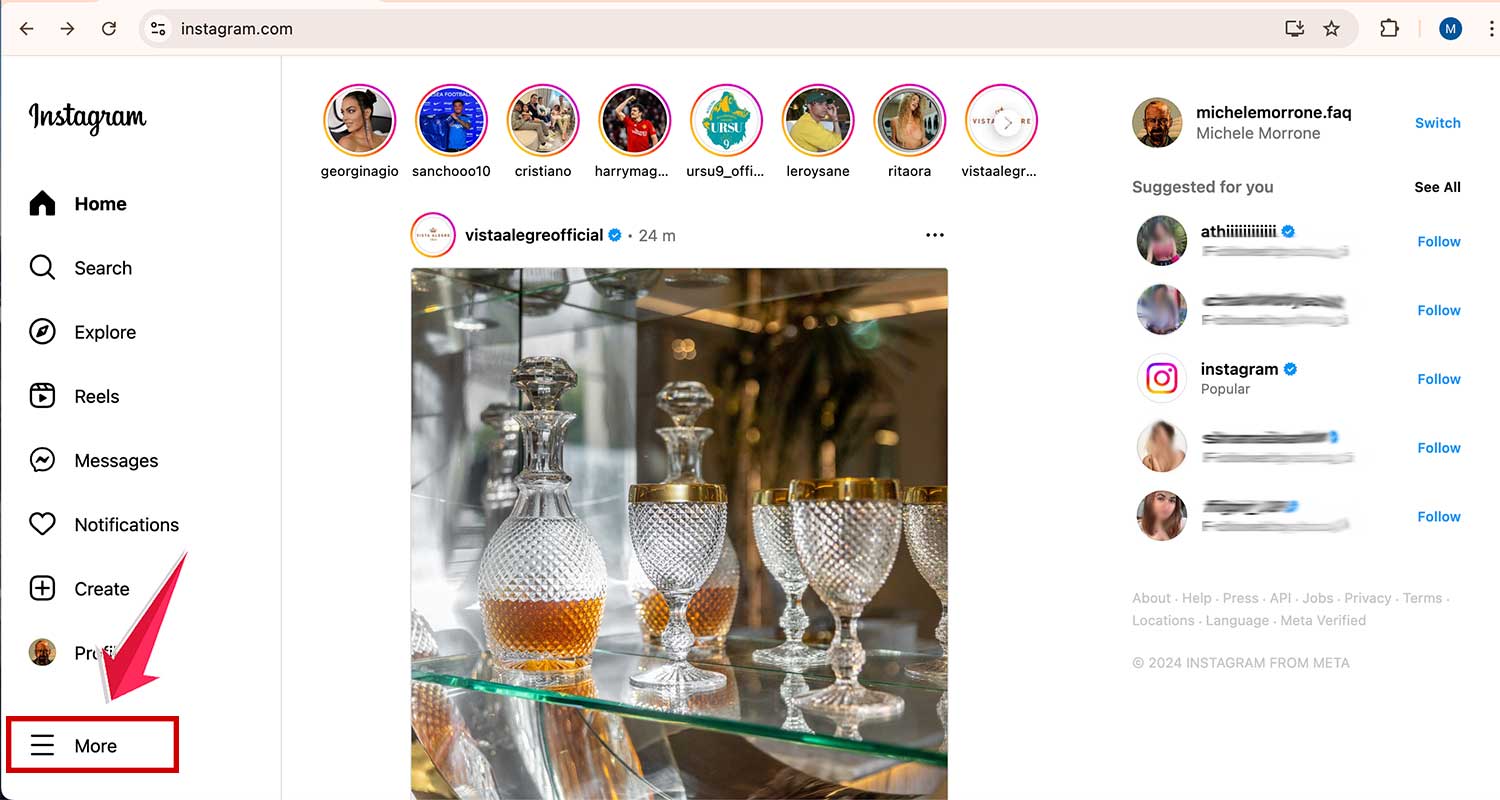
- Open your web browser and navigate to Instagram.com.
- Log in and click on More in the bottom right corner.
- Select “Your activity” from the menu.
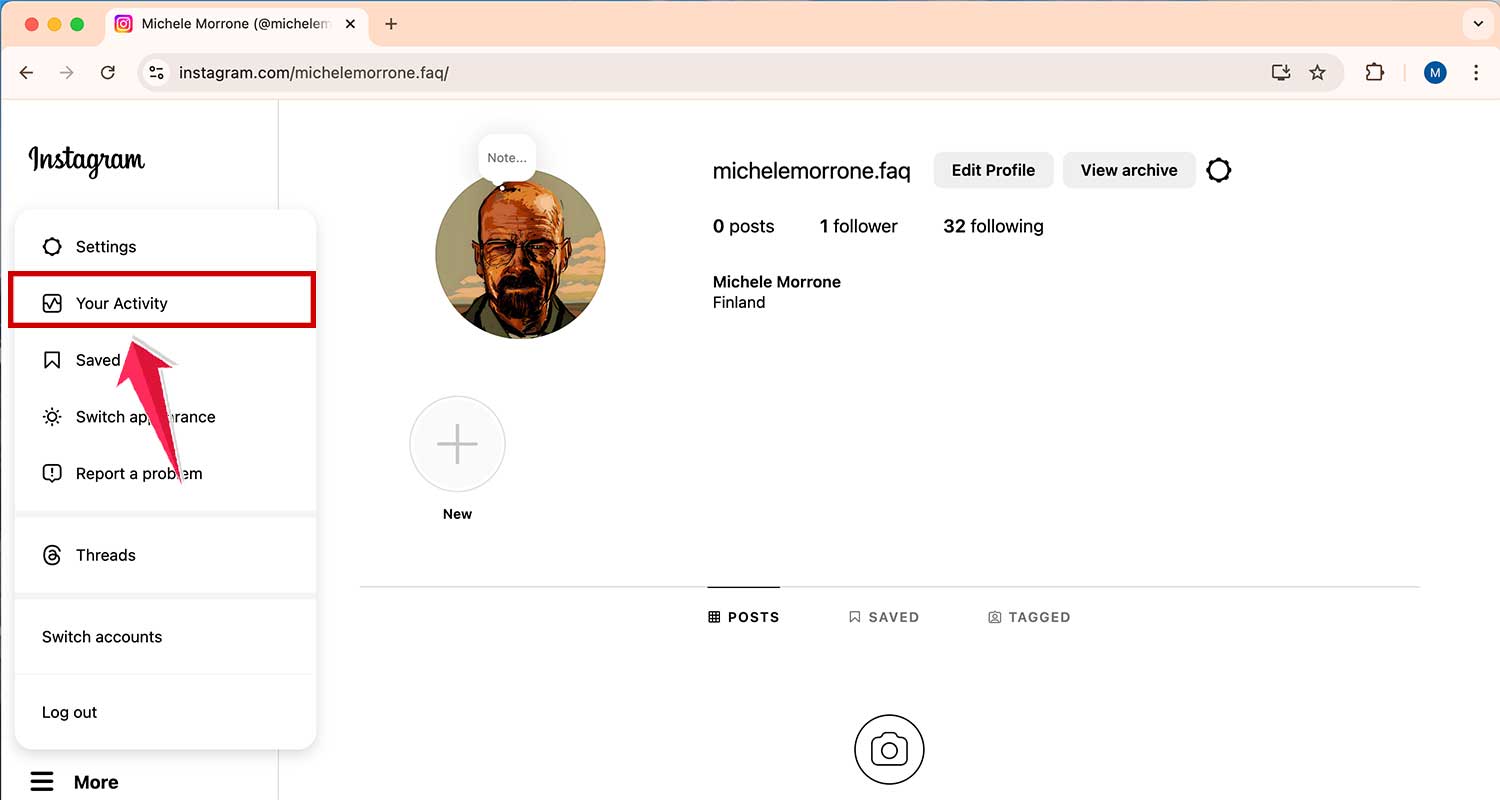
- Scroll down and click “Download your information”.

- Then click on Continue to proceed further.

- A new window will be opened. Click on “Download or transfer information”.

- Then click on “All available information”.

- Now choose the Download to Device option and click Next. You may also choose “Transfer to destination” if you want to transfer your information to another device or service.
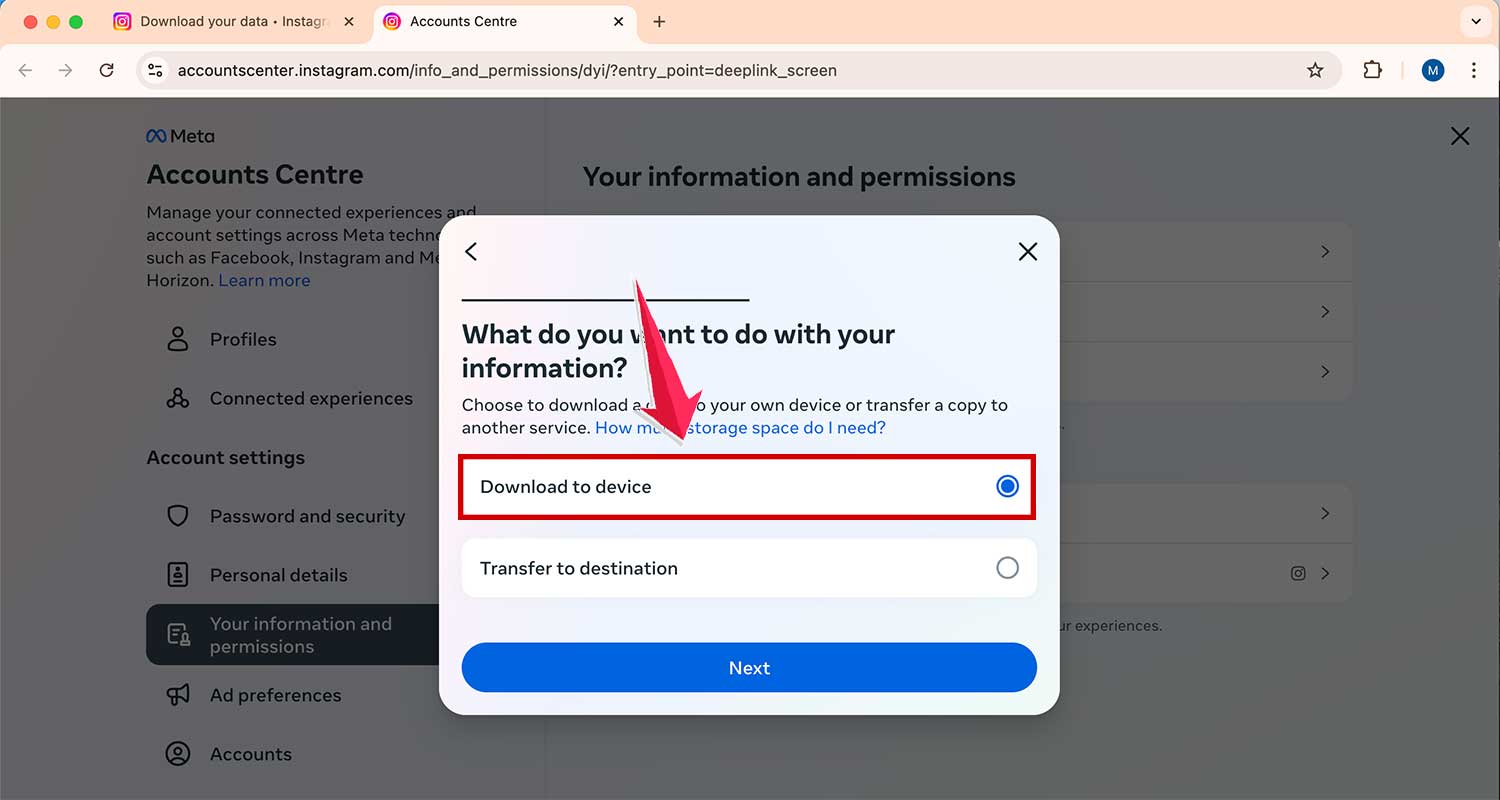
- Then, choose Date Range, Notify your email, and select HTML format. You can also choose Media quality if you want to.

- Now click on Create files and wait for the email from Instagram (this usually takes less than an hour).

- Click the download link in the email you receive or click on Download on Instagram in the Download Your Information window.

- After downloading, unzip the file and locate the “followers_and_following” folder.

- Open the “pending_follow_requests.html” file to view your sent requests.

By following these steps, you’ll be able to access your sent follow requests on both mobile devices and computers.
Why does Instagram make it so tricky?
You might be wondering why Instagram has made it more challenging to find your sent follow requests.
1. First off, Instagram is always battling against bots and spam. By making it a bit trickier to access sent follow-up requests, they’re trying to discourage automated tools from sending out loads of requests. This helps keep the platform more genuine and user-friendly.
2. Secondly, Instagram is constantly evolving and prioritizing features. Sometimes, less frequently used features get shuffled around or changed. It’s their way of streamlining the app and focusing on what most users need day-to-day.
3. Safety is a top priority for Instagram. They’re always working to make the platform more secure for everyone. Sometimes, this means changing how certain features work or where they’re located, like hiding your friends list on Instagram is one the Instagram’s top privacy features.
4. Lastly, remember that Instagram is a free service. While they aim to provide a great user experience, sometimes we need to adapt to their changes. They’re always trying to balance user needs with platform security and efficiency.
The takeaway
You’ve made it through the Instagram maze, and now you’re equipped to find those elusive sent follow requests. It might take a few more clicks than before, but you’ve got this!
Remember, Instagram’s changes are all about keeping things secure for you and everyone else. They’re not trying to make your life difficult – promise!
Whether you’re on your phone or computer, you now have a step-by-step guide to uncover your pending requests. It’s like having a secret map of hidden treasure, except the treasure is your own Instagram data.
Don’t let these changes discourage you from connecting with others. Keep sending those follow requests, and when you need to check on them, you know exactly what to do.
And remember, managing your connections on Instagram goes beyond just following requests. And, that’s why it is always advised to always keep an eye on who has recently followed you on Instagram.
So go ahead and explore your account data with confidence. And if you ever forget how just pop back here for a refresher.