If you’re frantically searching for ways to delete your Instagram call history, I get it. You’re probably feeling anxious, maybe even a bit panicked. Whether it’s a call you shouldn’t have made or a conversation you’d rather forget, you need this evidence gone – and fast.
Maybe you’ve got some explaining to do to your partner, or you’re trying to avoid a potentially explosive situation. Whatever’s going on, your privacy is on the line, and you need a solution now.
Instagram doesn’t make erasing your call history straightforward. There’s no obvious “Delete All” button to make your problem disappear. That’s why you’re here, desperately looking for a way out.
In this guide, you’ll find several methods to wipe your Instagram call history clean. Whether you need to delete specific calls or clear out entire conversations, we’ve got your back.
Why do you need to delete your Instagram call history right now?
Maybe you’ve made some calls you’re not proud of, or you’re trying to avoid some serious drama. Whatever the reason, you need those call logs gone yesterday. Let’s break down why this matters so much.
You’ve got some calls that need erasing. Those late-night calls? The ones you shouldn’t have made? Yeah, we both know they need to vanish. It’s not about judging – it’s about protecting yourself.
Your relationship might be on the line here. Imagine your partner scrolling through your call history. Not a pretty picture, is it? A clean slate can mean the difference between a peaceful evening and a full-blown argument.
Your privacy is at stake, and it’s worth protecting. Think about it – your calling habits are nobody’s business but yours. By wiping the slate clean, you’re taking back control of your personal information.
You’re tired of coming up with explanations, aren’t you? The fewer call logs you have, the fewer awkward questions you’ll face. From anyone – your partner, your friends, your family. Sometimes, the less said, the better.
How to delete your Instagram call history?
Instagram doesn’t make it easy to erase your call history, but there are a couple of ways to manage it. Let’s look at your options:
1. Delete individual calls within a chat
Instagram now allows you to remove specific call logs from a conversation without deleting the entire chat.
- Open Instagram and go to your direct messages.
- Find the chat containing the call history you want to delete.
- Tap on the chat to open it.

- Locate the call log you want to remove.
- Press and hold on to the specific call log.
- A menu will appear. Tap “Delete For You“.
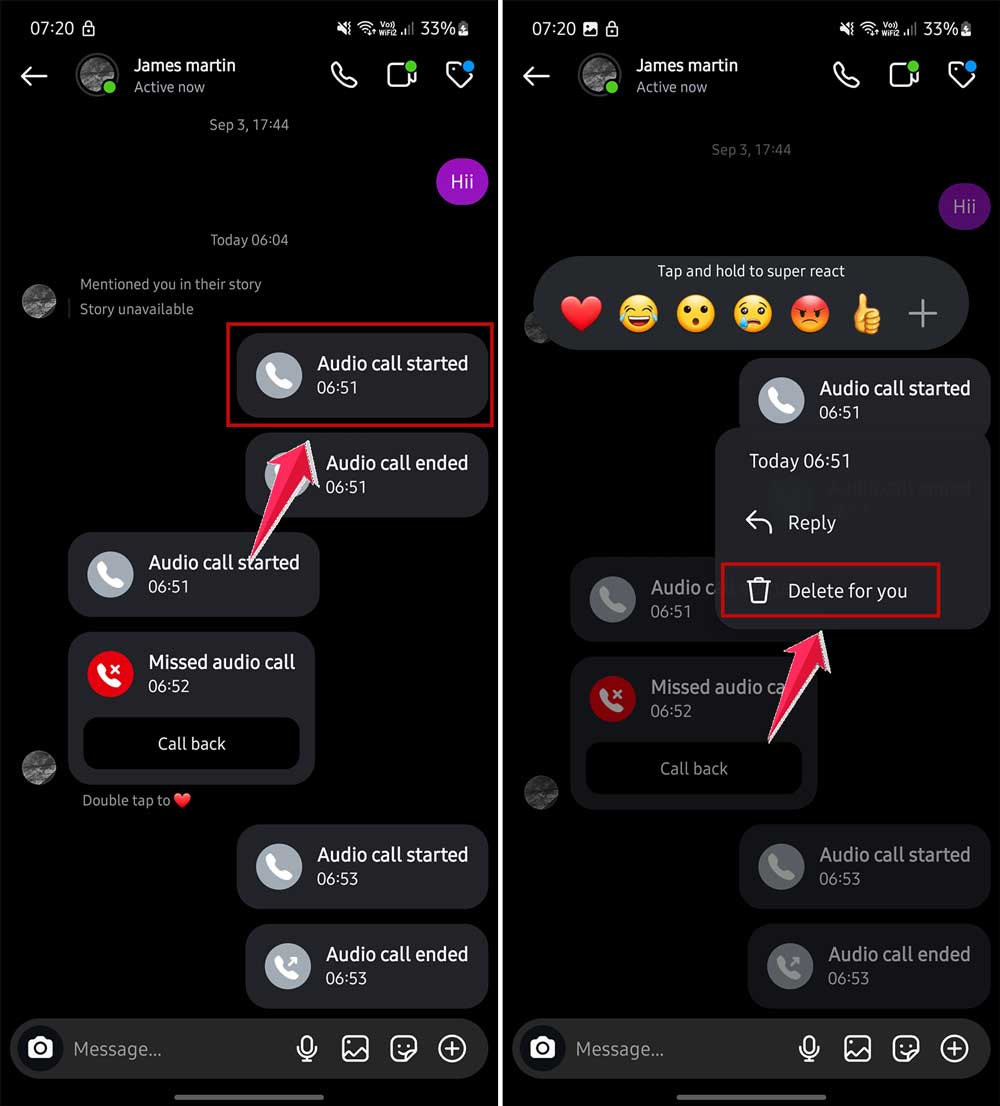
- Click on this option and mark all your chats, and again click “Delete For You” to confirm in the bottom bar.
- All your selected chats or calls will be deleted.

Remember: This action only removes the call log from your view. The other person might still see it in their chat history.
2. You can delete the entire chat to remove all call history as well
If you want to remove all call logs along with the entire conversation, you can delete the whole chat:
- Open Instagram and go to your direct messages.
- Find the chat you want to delete.
- Press and hold on to the chat.
- When the menu appears, tap “Delete“.
- Confirm your choice when prompted.
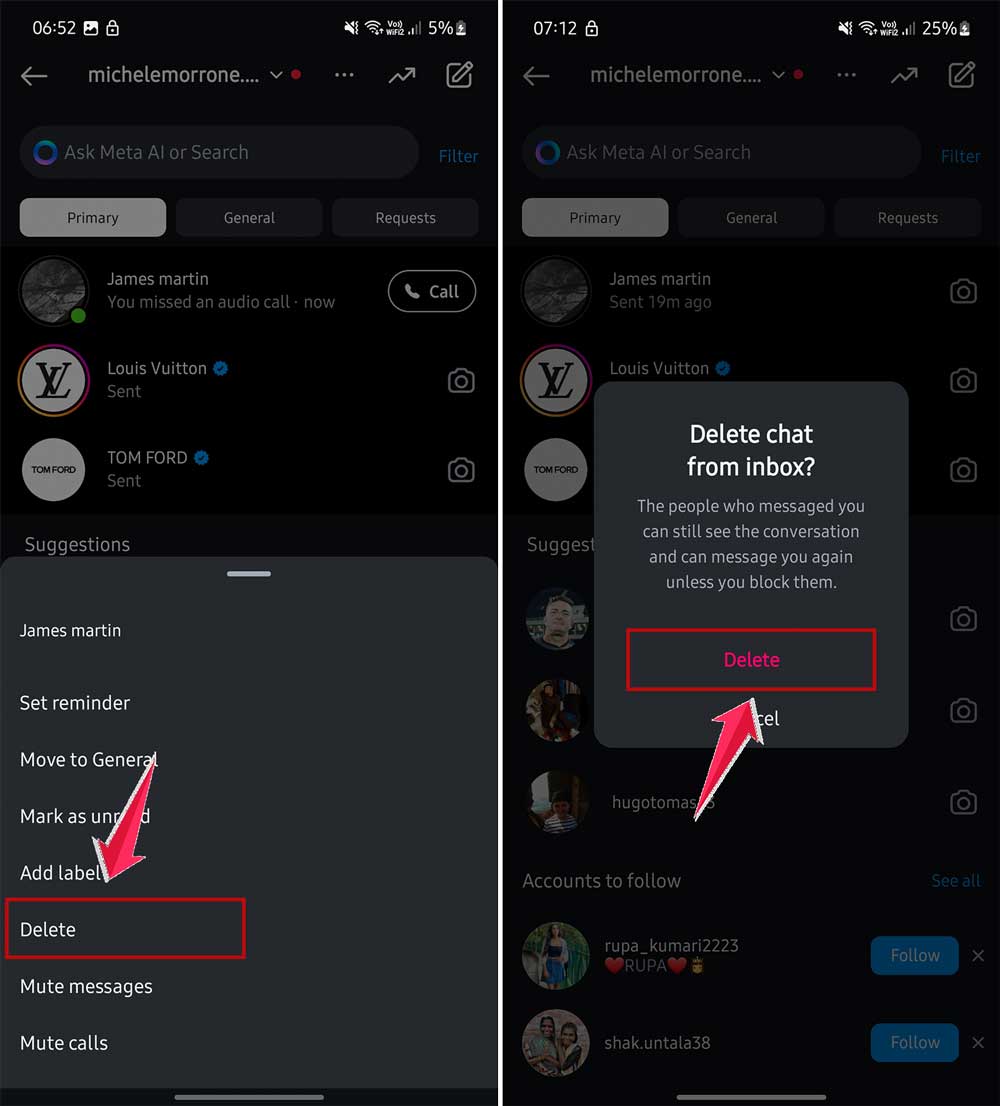
Be careful: This will erase the entire chat, including all messages and call logs. Make sure you’re okay with losing all that information before proceeding.
Important note: Deleting a chat or call log from your end doesn’t remove it from the other person’s Instagram. They may still have a record of your conversations and calls.
3. Delete call history from the ‘Calls’ section
Update: It’s important to know that Instagram has removed this option from the app now. You don’t see any special option or tab for Call now.
4. Using Vanish Mode for future conversations
If you want to keep your chats and calls tidy going forward, try Instagram’s Vanish Mode:
- Open the Instagram app.
- Go to a chat or start a new one.

- Swipe up from the bottom of the chat screen.
- Release when “Vanish Mode” appears.
- Chat turns dark, indicating You turned on vanish mode.
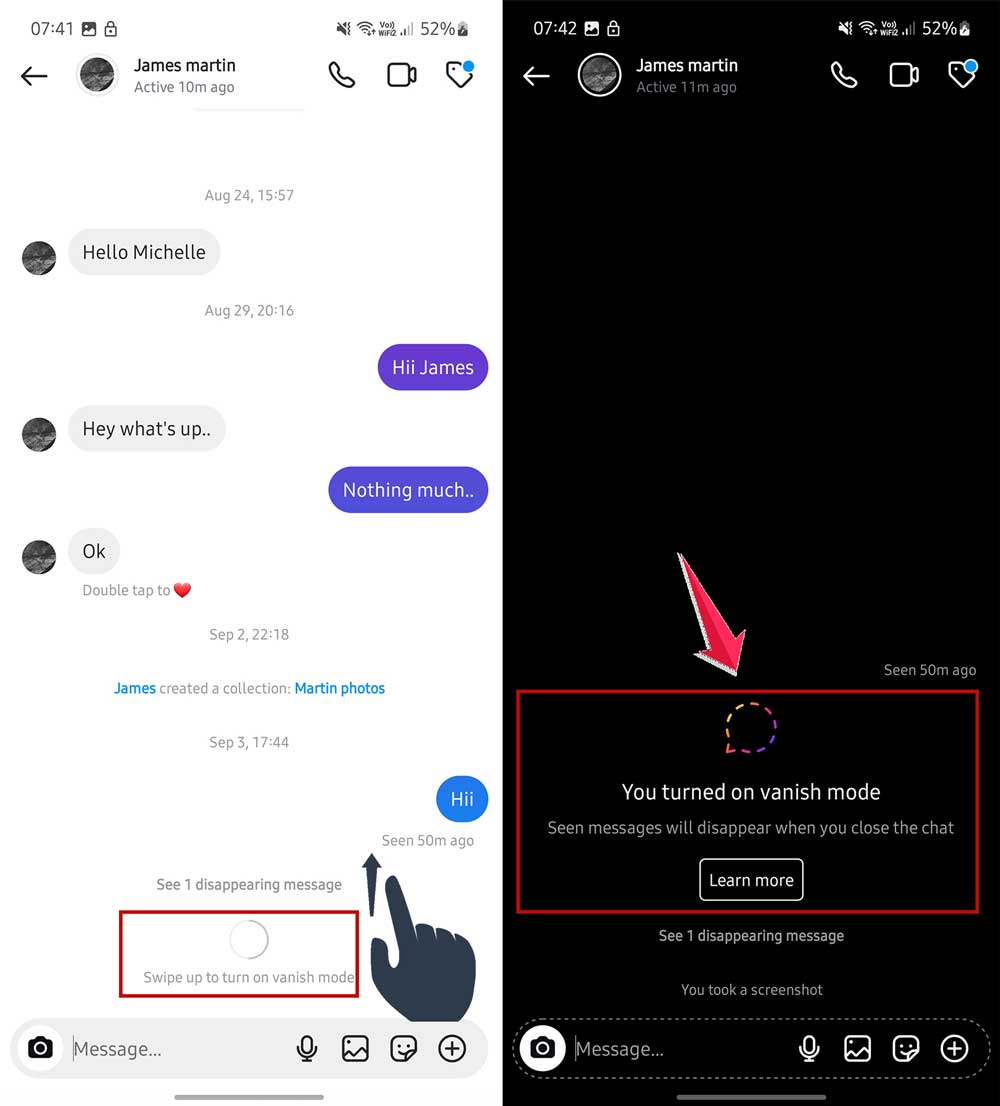
- Send messages as usual.
- To exit, swipe up again.
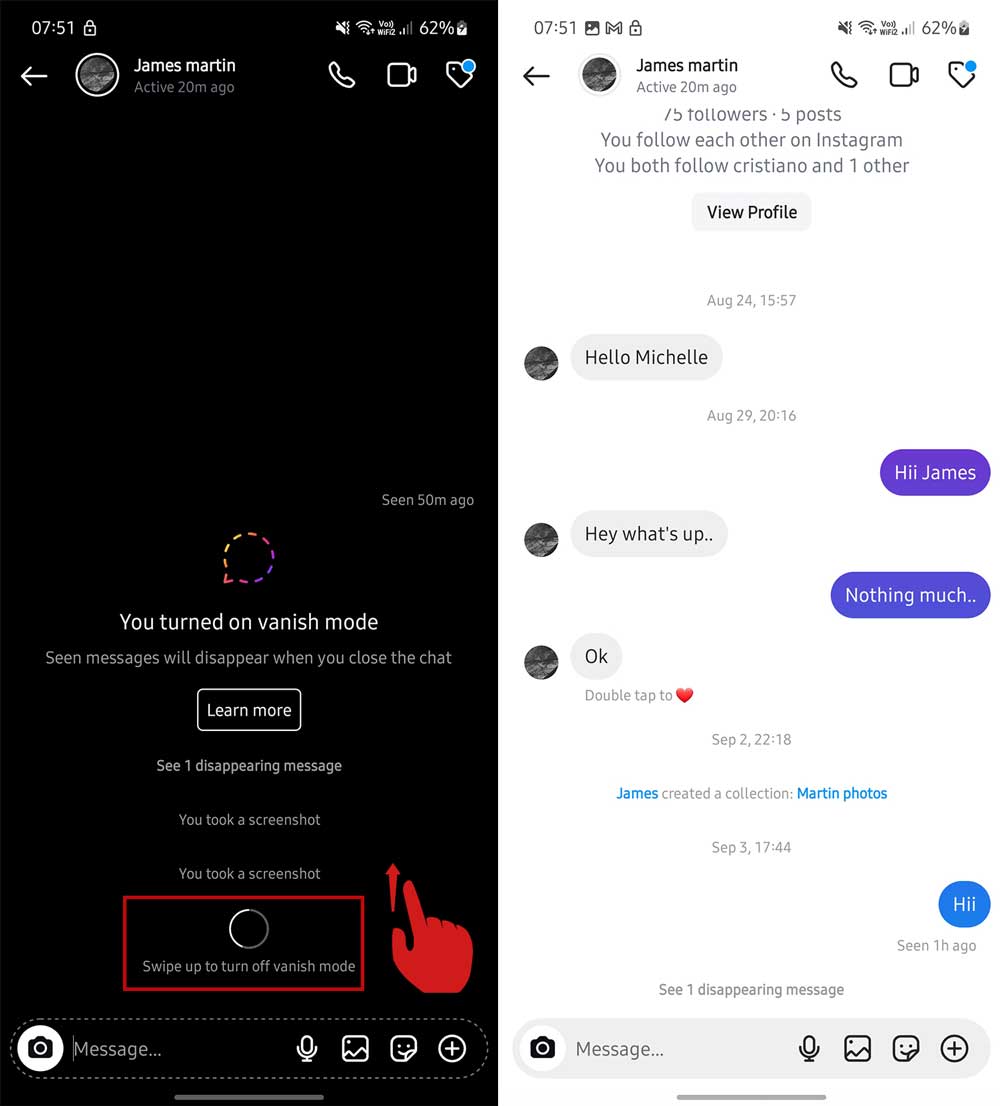
Now, your messages and calls in this chat will disappear after they’re read. It’s like having a self-cleaning conversation!
5. Clearing Instagram cache (for Android users)
If you’re an Android user, clearing the Instagram cache can help remove some stored data, including call logs:
- Go to your phone’s Settings.
- Tap on “Apps” or “Application Manager“.
- Find and tap on “Instagram”.

- Tap on “Storage“.
- Tap “Clear Cache“.

Note that this won’t delete your account data, but it can help refresh the app and potentially remove some call history data.
6. Limiting call permissions
To prevent future call logs, you can limit Instagram’s call permissions:
- Go to your phone’s Settings.
- Find “Apps” or “Application Manager“.
- Tap on “Instagram“.
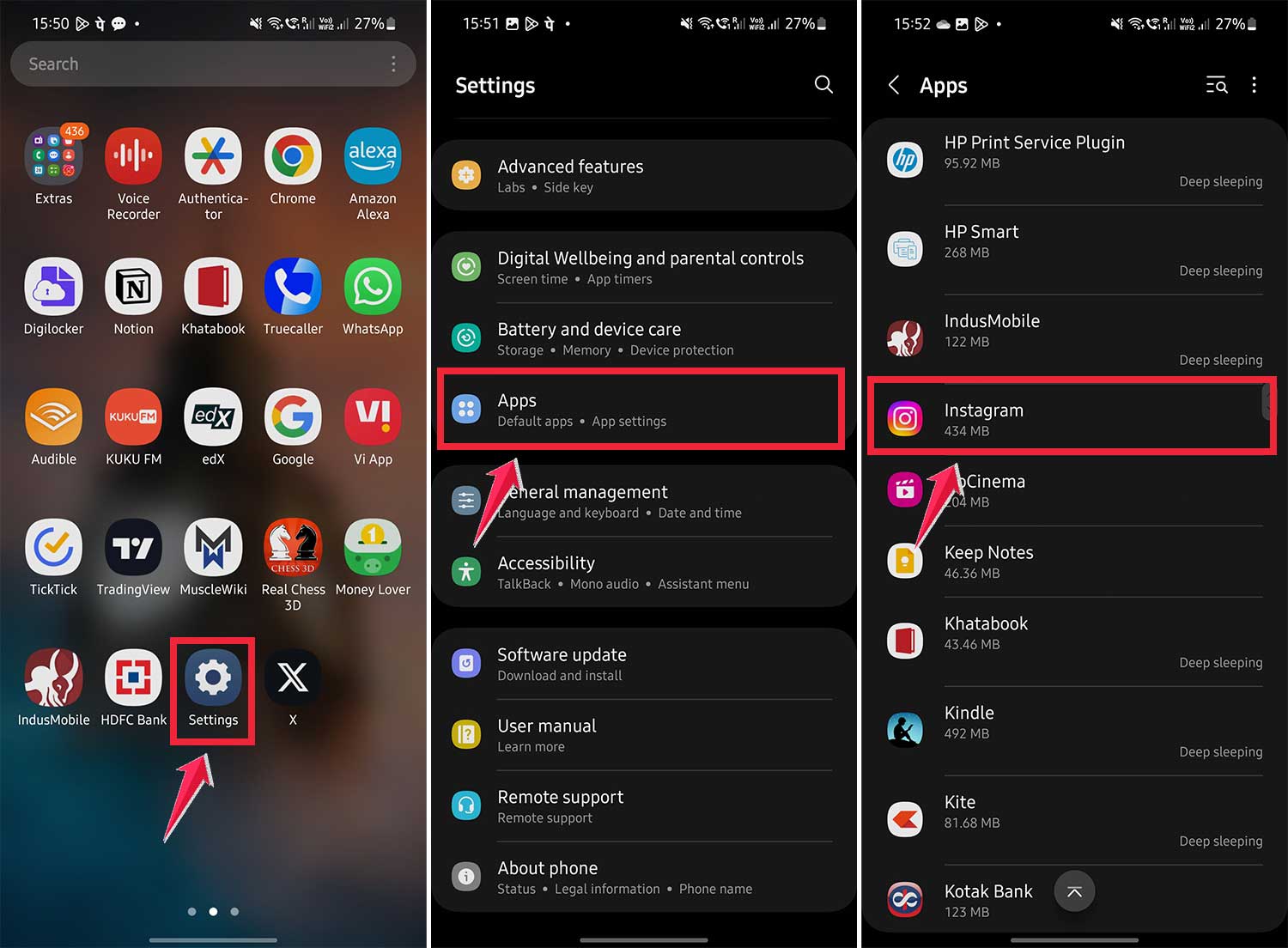
- Go to “Permissions” then click on the “Call logs” and “Phone” one by one.

- Turn off the “Phone” or “Call” permission.
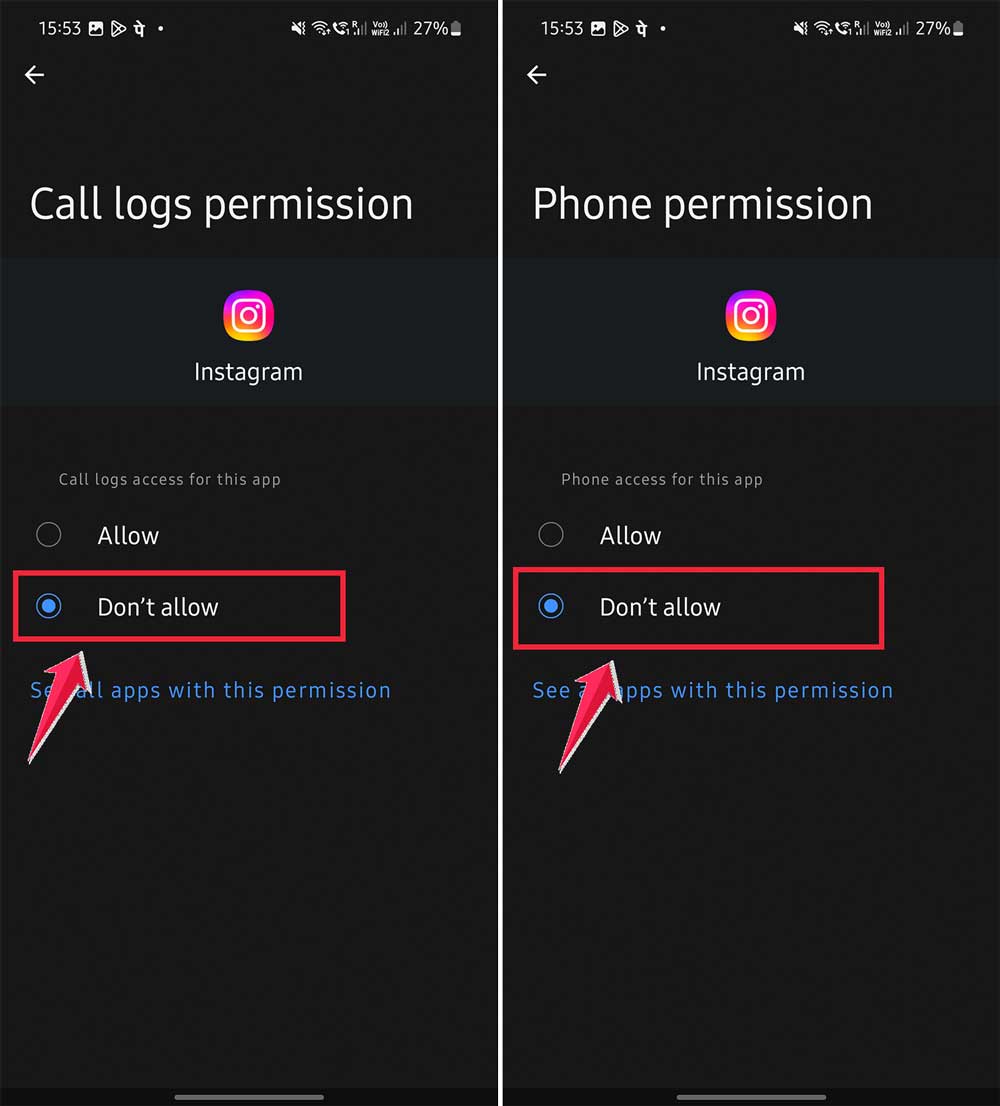
Remember, this will prevent you from making calls through Instagram.
The takeaway
Alright, let’s wrap this up. We’ve been through a lot together, haven’t we? From panicked searches to step-by-step solutions, you’re now armed with the knowledge to clean up your Instagram call history like a pro.
Remember, the key here is to act fast and be thorough. Whether you’re using the chat deletion method, the individual call log removal, or even going as far as clearing your app cache, you’ve got options. The most important thing is to choose the method that works best for your situation and stick to it.
Now, don’t fall into the trap of thinking this is a one-time fix. Keeping your digital tracks clean is an ongoing process. Make it a habit to regularly review and clean up your call logs. It’s like digital hygiene – a little maintenance goes a long way in preventing future panic attacks.
So, take a deep breath. You’ve got this under control now. Your secret calls are about to become just that – secret. And hey, moving forward, maybe think twice before making those risky calls, huh
? But if you do slip up (we’re all human, after all), you know exactly what to do. Stay safe out there, and keep your Instagram squeaky clean!