Have you ever wondered who can see your Instagram bio? Many Instagram users are curious about the privacy of their profile information, especially that short but important bio section.
Your Instagram bio is like your digital introduction. It’s where you tell the world a bit about yourself or your brand. But maybe you’re concerned about who exactly can read this information. Perhaps you’ve shared something personal, or you’re just not comfortable with everyone seeing it.
This is a common worry in today’s world, where we are taking care of our privacy to the maximum extent. You might want to share some details with your followers, but not with every random person on the internet. Or maybe you’re running a business account and want to make sure your bio reaches the right audience.
In this article, we’ll clear up the confusion about Instagram bio visibility. You’ll learn how public your bio really is, what you can do to control its visibility, and the pros and cons of different privacy settings.
What information is public in an Instagram bio?
When it comes to your Instagram bio, you should note that it’s always visible to everyone, even if your account is private. You can’t do anything about it.
This means anyone who looks at your profile can see your bio, along with your profile picture, username, follower count, following count, and post count.
If you’re worried about privacy, you have options. You can set your account to private to protect your posts and stories, but remember, those basic profile elements will still be public.
If you’re really concerned about your bio being visible, here’s a simple solution: you can leave it blank. You don’t have to put anything in your bio if you don’t want to.
- Go to your profile.
- Tap “Edit Profile“.
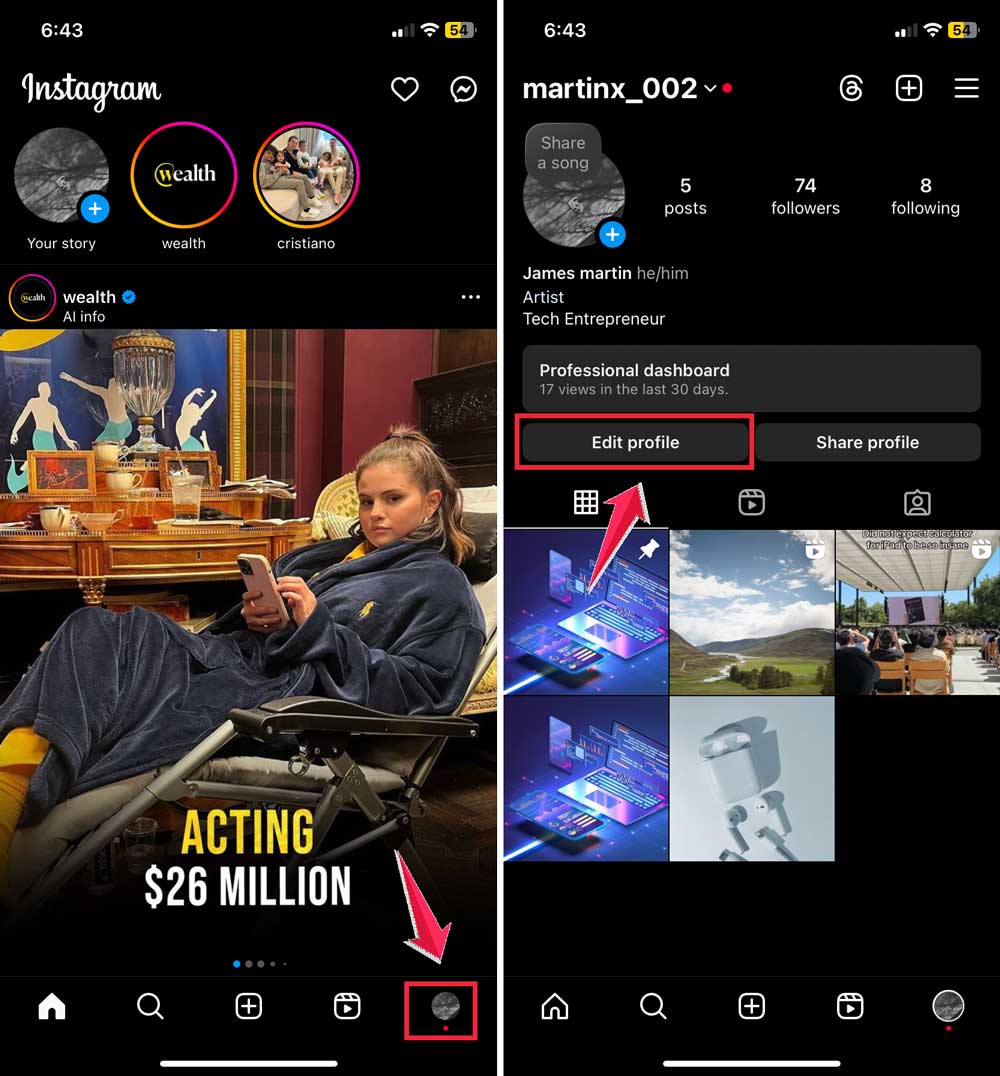
- Find the “Bio” section.
- Delete any text there.
- Save your changes.
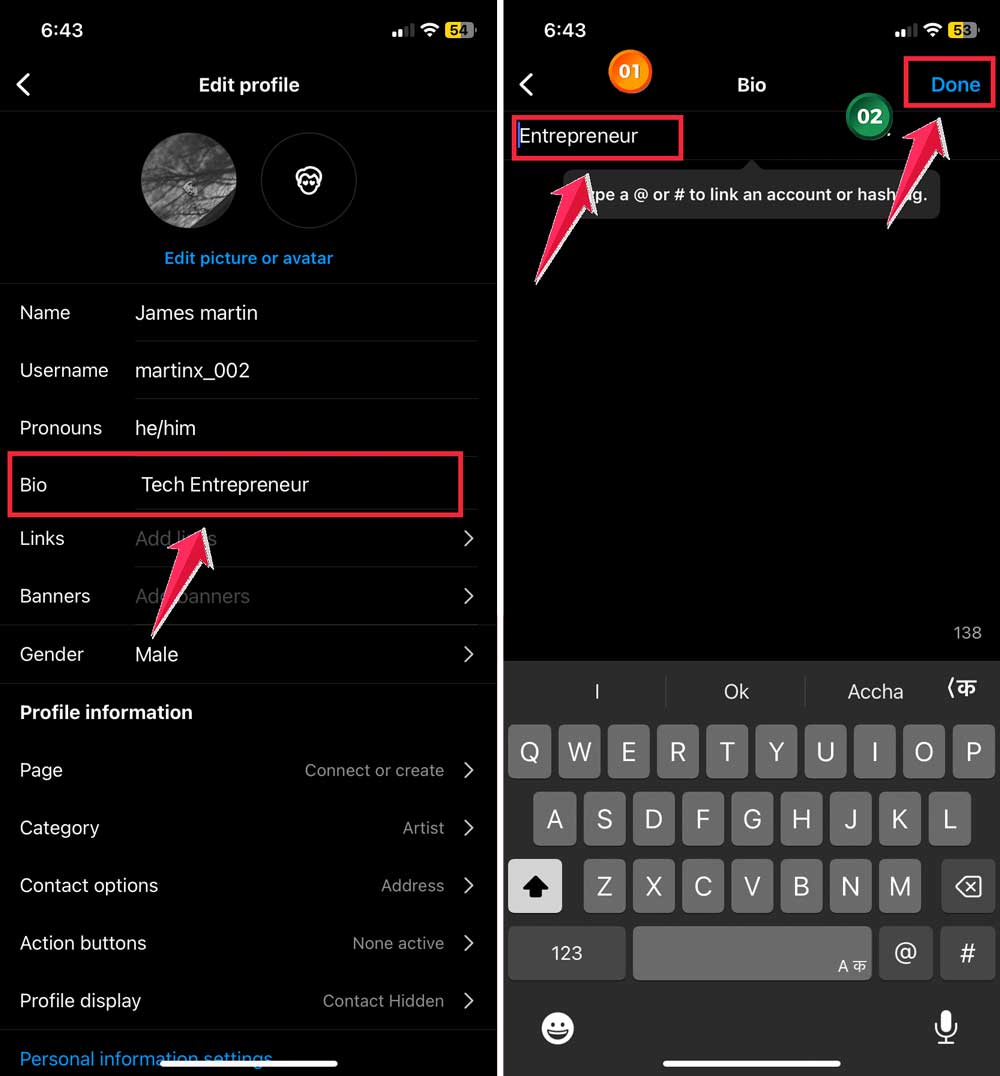
It’s that easy. You can use Instagram normally without any information in your bio. Some people prefer this minimal approach, while others like to share more.
It’s all about what makes you comfortable. Just remember, even with a blank bio, your other profile basics will still be visible to everyone.
How can you make your Instagram bio private?
Your Instagram bio is always public, even if your account is set to private. Here’s what you need to know:
- Public information: Your bio, profile picture, username, follower count, following count, and post count are always visible to everyone on Instagram.
- Privacy settings: When you set your account to private, you’re only hiding your posts, stories, and other content. Your bio remains public.
- No separate bio privacy: There’s no option to make just your bio private while keeping other parts of your profile public.
If you’re concerned about privacy, here are your options:
- Keep it minimal: You can choose to put very little or no information in your bio.
- Set the account to private: This won’t hide your bio, but it will protect your posts and stories.
- Be selective: Only include information in your bio that you’re comfortable with everyone seeing.
To set your account to private:
- Go to your profile.
- Tap the menu icon (three lines).
- Select ‘Settings and activity‘.
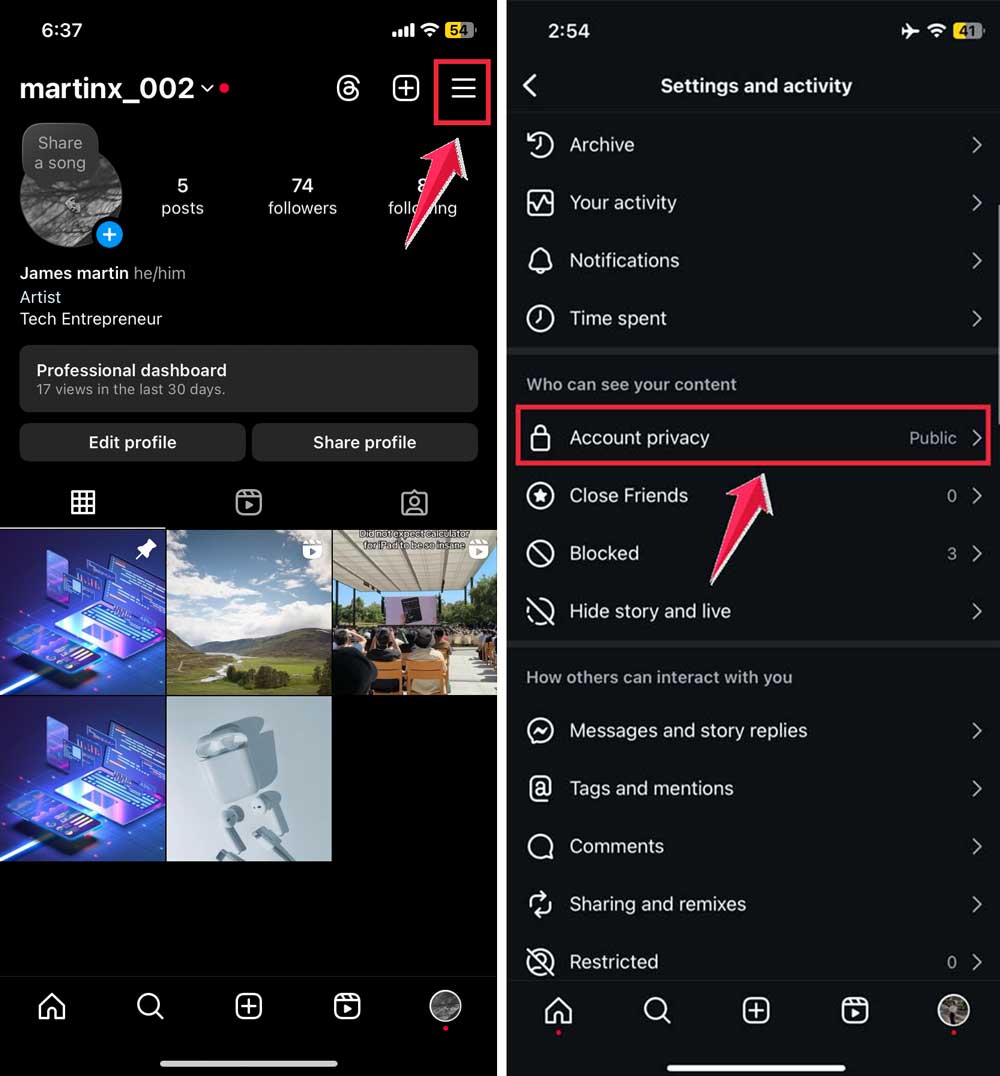
- Scroll down and tap ‘ Account privacy‘.
- Toggle on ‘Private Account‘.

Remember, this won’t make your bio private, but it will restrict access to your posts and stories to only approved followers.
If you’re really concerned about your bio being visible, your best option is to leave it blank or include only information you’re comfortable sharing publicly.
The takeaway
Now you know the deal with your Instagram bio – it’s always visible to everyone, no matter your account settings. That little description under your profile pic? It’s your public introduction to the Instagram world.
But don’t worry, you’ve got options. While you can’t hide your bio, you can control what you share there. Maybe you want to keep it simple with just your name, or perhaps you’re cool with sharing a bit more. It’s all up to you.
Remember, setting your account to private won’t affect your bio’s visibility. It’ll hide your posts and stories, but that bio stays out there. So think of it as your Instagram handshake – share what you’re comfortable with everyone knowing.
The key here is finding your comfort zone. Whether you choose to fill your bio with fun facts or keep it blank, make sure it feels right for you. After all, it’s your profile, and you get to decide how you present yourself to the Instagram community.